Give the customer a quote before you leave the driveway.
Prizm builds quotes across the manufacturers you carry in minutes, using your own costs and markups — and it's built to work with QuickBooks Online.
A focused walkthrough for your manufacturers, margins, and quoting process.

Built for the quote
Capture the job once. Compare the lines you sell. Leave with a firm number.
The product
Build the job. Compare the options. Keep the margin visible.
Prizm brings configuration and comparison into one quoting workflow, so your team can move from the opening to a clear customer choice without rebuilding the same job in separate portals.
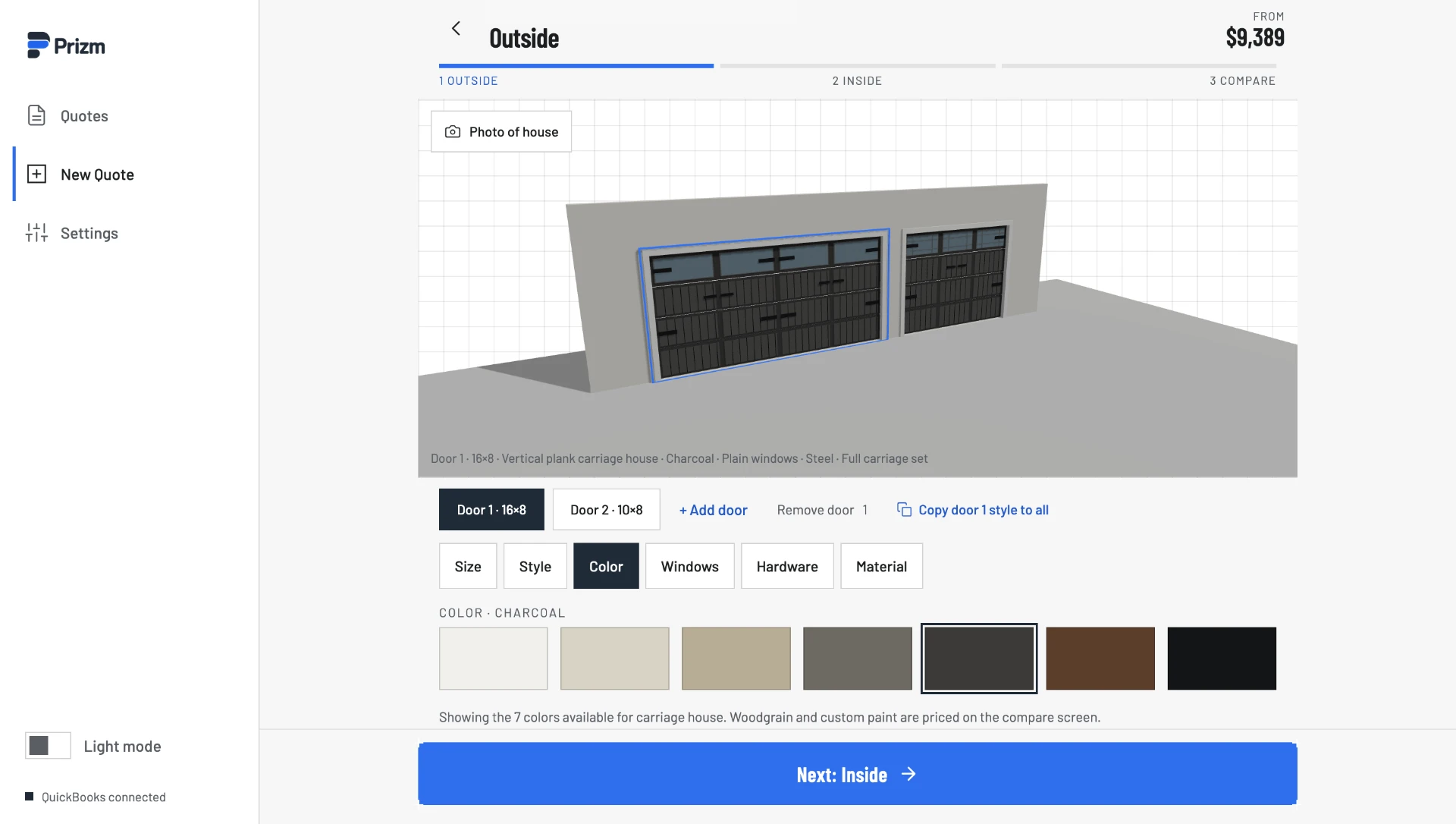
Build the opening and product details in one guided workflow, with the available choices kept in context.
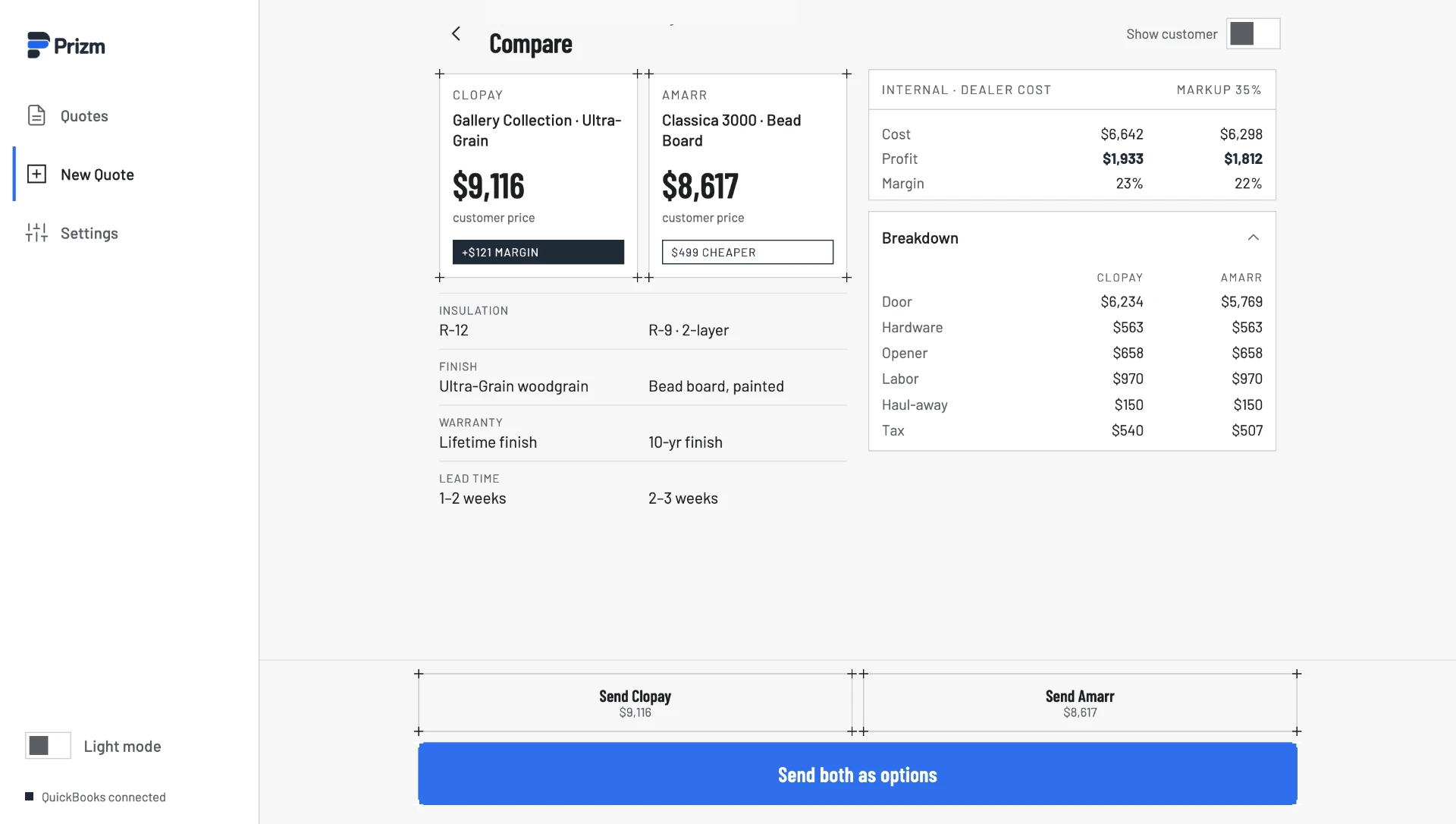
Compare customer options side by side while keeping dealer cost, markup, margin, and the full breakdown visible.
Where it gets stuck today
The slow part is getting to the number.
One quote, many portals
You log into each manufacturer portal to price the same job, then piece the numbers together by hand.
Markups by memory
Costs and markups live in your head or a spreadsheet, so two techs quote the same door two ways.
Everything typed twice
The quote gets re-entered into QuickBooks later. The tech leaves without a firm number, and the job waits.
What we're building
From driveway to books in four steps.
One connected path from the first photo to the approved quote — without sending your team through disconnected portals and spreadsheets.
- 01
Capture
The tech takes photos, enters measurements, and notes the style the customer wants.
- 02
Configure
Prizm applies your own costs and markups, so the price matches how you actually sell.
- 03
Compare
See side-by-side options across the manufacturers you carry and hand the customer a choice.
- 04
Send to QuickBooks
Quotes are designed to flow into QuickBooks Online for approval and payment — no double entry.
Built around the shop
What it should do for your shop.
One quoting workflow designed around the details that matter to a working dealer.
Quote on the first visit
Give a firm number while you are still on site, instead of calling back two days later.
Consistent margins
Your costs and markups are applied the same way on every job, by every tech.
No double entry
Built to work with QuickBooks Online, so the quote you sent is the record you bill from.
Photo documentation
Job records and photos stay with the job for documentation and dispute protection.
See it with your workflow
See how Prizm gets your team to the quote.
We'll focus the walkthrough on the lines you carry, the way you manage costs and markups, and what happens after the customer chooses.
Request a demoWhat we'll cover
- Configure a job from the opening outward
- Apply your costs and markups consistently
- Compare multiple customer-ready options
What to bring
- The manufacturers your shop carries
- How your team builds quotes today
- Where quoting slows down or gets re-entered
Questions, answered honestly.
Can I see Prizm with my shop's workflow?+
Yes. Request a demo and tell us which manufacturers you carry, how you quote today, and which accounting system you use. We'll tailor the walkthrough around that process.
Which manufacturers will it cover?+
Prizm is designed for multi-line dealers. Clopay, Amarr, C.H.I., Wayne Dalton, and Raynor are on the roadmap. Tell us what you carry when requesting a demo.
QuickBooks Online or QuickBooks Desktop?+
Prizm is built to work with QuickBooks Online. Desktop is not part of the first version.
Do I need my own manufacturer integrations?+
No. You do not have to set up anything with a manufacturer. You tell us the lines you carry and your costs, and we handle the rest.
What will it cost?+
Pricing is not published yet. We will explain current availability and next steps during the demo, with no obligation.
Built for the quote